
diff options
Diffstat (limited to 'README')
| -rw-r--r-- | README | 86 |
1 files changed, 54 insertions, 32 deletions
@@ -1,6 +1,3 @@ -[](https://github.com/rhaberkorn/sciteco/actions/workflows/ci.yml) -[](https://github.com/rhaberkorn/sciteco/releases/tag/nightly) - Overview ======== @@ -16,7 +13,7 @@ as far as possible. For instance, moving the cursor to the right can be done imm When you delete a character from the end of the command line macro (called rubout), the side-effects of that character which may be a command or part of a command, are undone. - +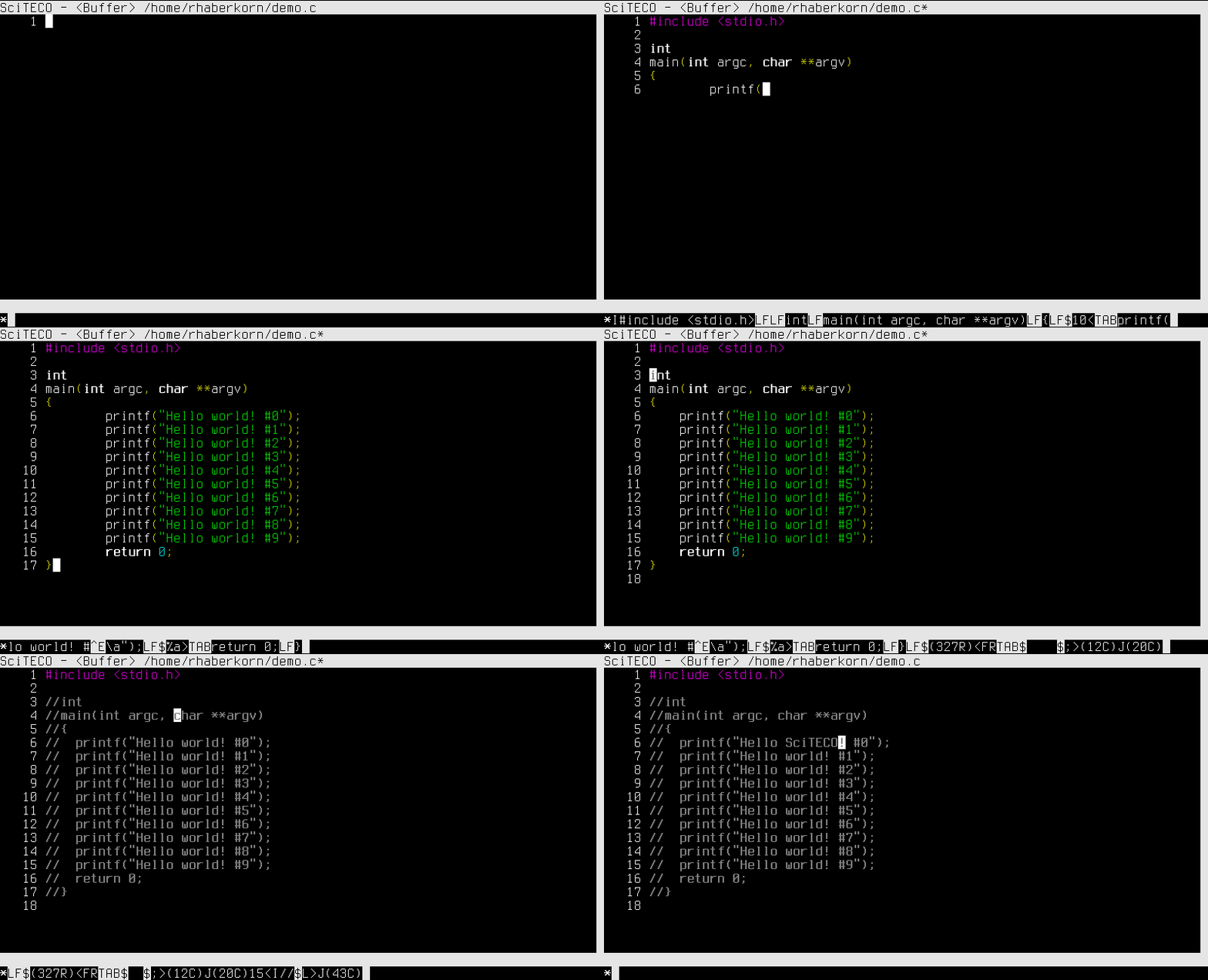 SciTECO uses the [Scintilla](https://www.scintilla.org/) editor component and supports GTK+ 3 as well as Curses frontends (using [Scinterm](https://foicica.com/scinterm/)). @@ -29,7 +26,7 @@ The Curses frontend is verified to work with [ncurses](https://www.gnu.org/softw All X/Open-compatible libraries should be supported. SVr4 curses without enhanced definitions is **not** supported. -Linux, FreeBSD, [Mac OS X](https://github.com/rhaberkorn/sciteco/wiki/Mac-OS-Support), +Linux, FreeBSD, NetBSD, [Mac OS X](https://sciteco.fmsbw.de/knowledge/Mac%20OS%20Support), Windows (MinGW 32/64) ~~and [Haiku](https://www.haiku-os.org/) (gcc4)~~ are tested and supported. SciTECO compiles with both GCC and Clang. SciTECO should compile just fine on other UNIX-compatible platforms. @@ -76,6 +73,9 @@ Features This makes it even harder to destroy work by accident than in most other editors. Rubbed out commands can be re-inserted (redo). +* Timing-based recovery mechanism: + Modified buffers are regularily dumped into **#**_files_**#** to protect against + crashes and unexpected restarts etc. * Munging: Macros may be munged, that is executed in batch mode. In other words, SciTECO can be used for scripting. By default, a profile is munged. @@ -100,13 +100,15 @@ Features to be used interactively on system terminals, can be integrated into UNIX pipelines and can be extended with external command-line tools (see `EC` command). + It can easily replace tools like *sed* and *awk*. * Themeability and consistency: Color settings (or schemes) are applied consistenly across all supported platforms. Gtk+ builds allow further customization using CSS. The user interface is kept minimalistic and is consistent in spirit across the different platforms. -* Syntax highlighting, styles, line numbers, etc. thanks to Scintilla, Lexilla and Scintillua. +* Syntax highlighting, styles, line numbers, folding, etc. thanks to Scintilla, Lexilla and Scintillua. Low-level Scintilla commands can also be accessed to extend SciTECO. SciTECO even syntax highlights code, written in the SciTECO language itself. +* Configurable command line with syntax highlighting. * A growing standard library of macros with frameworks for color schemes, syntax highlighting and buffer sessions. Optimized for hack-ability rather than completeness. @@ -116,59 +118,79 @@ Download There are prebuilt binary packages and source bundles for your convenience: -* [Github Releases](https://github.com/rhaberkorn/sciteco/releases) +* [Main download archive](https://sciteco.fmsbw.de/downloads) * [Download Archive at Sourceforge](https://sourceforge.net/projects/sciteco/files/) * [FreeBSD port](https://www.freshports.org/editors/sciteco/) [](https://repology.org/project/sciteco-curses/versions) -* [Ubuntu PPA](https://launchpad.net/~robin-haberkorn/+archive/sciteco) +* OBS repositories and binary downloads for RPM-based (Fedora, openSUSE, etc.) and + Debian-based (Debian, Raspbian, Ubuntu) distributions: + [](https://build.opensuse.org/package/show/home:rhaberkorn:sciteco:STABLE/sciteco) + * [Common packages](https://software.opensuse.org/download.html?project=home:rhaberkorn:sciteco:STABLE&package=sciteco-common) + * [Gtk packages](https://software.opensuse.org/download.html?project=home:rhaberkorn:sciteco:STABLE&package=sciteco-gtk) + * [Curses packages](https://software.opensuse.org/download.html?project=home:rhaberkorn:sciteco:STABLE&package=sciteco-curses) * [Arch User Repository](https://aur.archlinux.org/packages/sciteco-git) [](https://repology.org/project/sciteco/versions) -* [Alpine Linux package](https://pkgs.alpinelinux.org/package/edge/testing/x86_64/sciteco) +* [Alpine Linux package](https://pkgs.alpinelinux.org/package/edge/community/x86_64/sciteco) [](https://repology.org/project/sciteco/versions) * [Chocolatey package](https://community.chocolatey.org/packages/SciTECO) for Windows users [](https://repology.org/project/sciteco/versions) * Yocto/OpenEmbedded users should try the - [`sciteco` package from this layer](https://github.com/rhaberkorn/meta-rhaberkorn). + [`sciteco` package from this layer](https://git.fmsbw.de/meta-rhaberkorn/). * Users of OpenWrt may try to install the - [`sciteco` package of this feed](https://github.com/rhaberkorn/nanonote-ports). + [`sciteco` package of this feed](https://git.fmsbw.de/nanonote-ports/). +* ~~[Ubuntu PPA repository](https://launchpad.net/~robin-haberkorn/+archive/sciteco)~~ (deprecated) These releases may be quite outdated and not all of them are provided or tested by the author. -So you may also try out the [nightly builds](https://github.com/rhaberkorn/sciteco/releases/tag/nightly) - -they represent the repository's HEAD commit but may well be unstable. -Both ncurses and Gtk+ packages are provided for Ubuntu, generic Linux -(in the form of [AppImages](https://appimage.org/)) and Windows. -For [Mac OS X](https://github.com/rhaberkorn/sciteco/wiki/Mac-OS-Support), +So you may also try out the following nightly builds: + +* OBS repositories and binary downloads for RPM-based (Fedora, openSUSE, etc.) and + Debian-based (Debian, Raspbian, Ubuntu) distributions: + [](https://build.opensuse.org/package/show/home:rhaberkorn:sciteco:UNSTABLE/sciteco) + * [Common packages](https://software.opensuse.org/download.html?project=home:rhaberkorn:sciteco:UNSTABLE&package=sciteco-common) + * [Gtk packages](https://software.opensuse.org/download.html?project=home:rhaberkorn:sciteco:UNSTABLE&package=sciteco-gtk) + * [Curses packages](https://software.opensuse.org/download.html?project=home:rhaberkorn:sciteco:UNSTABLE&package=sciteco-curses) +* [Nightly builds](https://sciteco.fmsbw.de/downloads/nightly) + for Mac OS, Windows and Linux (AppImages). + +Nightly builds represent the repository's HEAD commit but may well be unstable. +For [Mac OS X](https://sciteco.fmsbw.de/knowledge/Mac%20OS%20Support/), we currently only provide *experimental* ncurses builds. If everything fails, you can try building from source. -See [`INSTALL`](https://github.com/rhaberkorn/sciteco/blob/master/INSTALL) for more details. +See [`INSTALL`](https://git.fmsbw.de/sciteco/tree/INSTALL) for more details. Community ========= -* Join our new [IRC chatroom](https://web.libera.chat/#sciteco): #sciteco at irc.libera.chat -* Report [bugs via Github](https://github.com/rhaberkorn/sciteco/issues) - if you can (or write an E-Mail to the author). -* You can also use [Github Discussions](https://github.com/rhaberkorn/sciteco/discussions) - for asking questions. -* We are also present in the [alt.lang.teco](https://newsgrouper.org.uk/alt.lang.teco) Usenet group, +* Report bugs or submit patches via the [hackers@fmsbw.de mailing list](https://git.fmsbw.de/?p=about). + You can also send an E-Mail to the author. + Bugs and planned features are managed in the [TODO](https://git.fmsbw.de/sciteco/tree/TODO) file, + so you might want to check it before sending your email. + Make sure to include `[sciteco]` in the mail subject. +* Use the [dings@fmsbw.de mailing list](https://git.fmsbw.de/?p=about) + for discussions and asking questions. + Make sure to include `[sciteco]` in the mail subject. +* Join our [IRC chatroom](https://web.libera.chat/#sciteco): #sciteco at irc.libera.chat +* We are also present in the [alt.lang.teco](https://newsgrouper.org/alt.lang.teco) Usenet group, but it is not restricted to SciTECO. Additional Documentation ======================== * Online manpages: - [__sciteco__(1)](https://rhaberkorn.github.io/sciteco/sciteco.1.html), - [__sciteco__(7)](https://rhaberkorn.github.io/sciteco/sciteco.7.html), - [__grosciteco.tes__(1)](https://rhaberkorn.github.io/sciteco/grosciteco.tes.1.html), - [__tedoc.tes__(1)](https://rhaberkorn.github.io/sciteco/tedoc.tes.1.html) -* [Tutorial](https://rhaberkorn.github.io/sciteco/tutorial.html): + [__sciteco__(1)](https://sciteco.fmsbw.de/sciteco.1.html), + [__sciteco__(7)](https://sciteco.fmsbw.de/sciteco.7.html), + [__grosciteco.tes__(1)](https://sciteco.fmsbw.de/grosciteco.tes.1.html), + [__tedoc.tes__(1)](https://sciteco.fmsbw.de/tedoc.tes.1.html) +* [Tutorial](https://sciteco.fmsbw.de/tutorial.html): This is what you see when you launch SciTECO for the first time. -* [Cheat Sheet and Language Overview](https://sciteco.sf.net/manuals/cheat-sheet.pdf). +* [Cheat Sheet and Language Overview](https://sciteco.fmsbw.de/manuals/cheat-sheet.pdf). This can be printed on an A4 sheet of paper. -* [Wiki at Github](https://github.com/rhaberkorn/sciteco/wiki) -* A [short presentation](https://sciteco.sf.net/manuals/presentation.pdf) +* [Knowledge Base](https://sciteco.fmsbw.de/knowledge/): + Contains [useful macros](https://sciteco.fmsbw.de/knowledge/Useful%20Macros), + the [FAQ](https://sciteco.fmsbw.de/knowledge/Frequently%20Asked%20Questions%20(FAQ)) etc. +* A [short presentation](https://sciteco.fmsbw.de/manuals/presentation.pdf) (in German!) hold at [Netz39](https://www.netz39.de/). -<p align="center"><img alt="SciTECO icon" src="https://github.com/rhaberkorn/sciteco/raw/master/ico/sciteco-48.png"/></p> +<p align="center"><img alt="SciTECO icon" src="https://sciteco.fmsbw.de/graphics/sciteco-48.png"/></p> |